 Skip to content

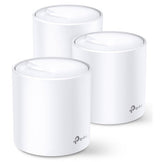
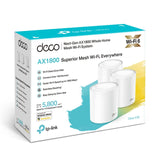


TP-Link Deco X20 (AX1800) Dual-Band WiFi 6 Whole-Home Mesh System - 3 Pack
Add multiple items to your order — pay just $25/week total, no matter how many items.
Browse more items →100% Traditional Layby. Delivery after full payment.
Attention, eager beaver! Need your delivery in a flash?
No worries, mate! We're here to save the day! Just give us an email atand let us know if you would like to pay more or less each week. Rest assured, we'll also provide you with an estimated delivery date when we make these changes. So don't you worry, your delivery dreams are in safe hands!
Â
Advanced Mesh Powered by Wi-Fi 6
Armed with Wi-Fi 6 technology, Deco whole home mesh Wi-Fi is designed to deliver a huge boost in coverage, speed, and total capacity. Get on the latest mesh Wi-Fi to enjoy the future network that loads faster and connects more.
- Enhanced Whole Home Coverage
- Seamless Roaming
- Connects over
- 150 Devices
- Faster Wi-Fi 6 Speed
- Greatly Reduced LagWi-Fi Dead Zone Killer
With clearer and stronger signals enhanced by BSS Color and Beamforming, Deco X20 boosts broader whole-home Wi-Fi up to 540 sqm (3-pack)*. Wireless connections and optional Ethernet backhaul work together to link Deco units, providing even faster network speeds and truly seamless coverage. Want more coverage? Simply add another Deco.True Seamless Roaming for Greater Experiences
TP-Link Mesh means Deco units work together to form one unified network. Your phone or tablet automatically connects to the fastest Deco as you move through your home, creating a truly seamless Wi-Fi experience. **
More Connections for Immersive Streaming
Enjoy a more efficient network with 4x the average throughput on connected devices in dense environments thanks to Wi-Fi 6 technology. Deco X20 is tested to connect over 150 devices without dragging down performance.***
Faster Wi-Fi 6 Speed = No Wait
The latest 1024-QAM and higher symbol rate combines to boost speeds up to 1.8 Gbps-ideal for bandwidth-intensive tasks like cloud gaming and 4K UHD video. Families will enjoy immersive live-streaming with flawless video and clear audio without buffering.*
Greatly Red uced Lag, More Fun
Wi-Fi 6 brings stable and responsive Wi-Fi connections to tomorrow's hyper-connected home. Enjoy more responsive gaming and seamless video chatting even when multiple compatible devices are connected and transmitting data at the same time.
Your Home, Our Care
Customize your home network with enhanced security using a kit of features built in TP-Link HomeCareTM. Whether protecting your sensitive data or limiting the access of kids and guests, HomeCareTM provides you the tools you need to fully manage your network.***
- Robust Parental Controls: Block inappropriate content and restrict time spent online
- Built-In Antivirus: Protect all connected devices in your home from online threats
- Quality of Service: Prioritize devices and applications for faster performance when needed
Setup Just Got a Lot Easier
Unbox Deco, install the app and then simply follow the on-screen directions. Deco app will take care of the rest, getting your network up and running in minutes.
1. Connect Deco to your cable modem and power on both devices
2. Download and launch the Deco app; just follow the in-app directions to finish the setup steps
3. Follow in-app instructions to configure your Deco system.
Wi-Fi Made Easy
- Easy Management: Manage your Wi-Fi at home or away on the Deco app, including seeing all connected devices, prioritizing your own, setting up a guest network, and more.
- Voice Control: Pair with Alexa to control Deco X20 with simple voice commands. Enjoy the convenient life.
- All Decos Work Together: Deco X20 is compatible with every other Deco model to form a mesh network. Expand mesh Wi-Fi coverage anytime by simply adding more Decos.
Â
Remarks
The use of Wi-Fi 6 and other features including OFDMA, MU-MIMO, 1024-QAM, and BSS Color require clients to also support the corresponding features.
*Maximum wireless signal rates are the physical rates derived from IEEE Standard 802.11 specifications. Actual wireless data throughput and wireless coverage, and quantity of connected devices are not guaranteed and will vary as a result of network conditions, client limitations, and environmental factors, including building materials, obstacles, volume and density of traffic, and client location.
**Clients need to support 802.11k/v/r and may require additional set up. Performance may vary depending on the client device
***HomeCareTM Pro is available for free for the first few months after subscription. Please check www.tp-link.com/homecare for more information.
POWER
AC adapter input 100-240V~50-60Hz 0.6A
AC adapter output 12 V/1.5 A
HARDWARE FEATURES
Ports 2x 10/100/1000 Mbps RJ45 ports
Button 1 RESET button on the underside
Power Consumption 13.5W max
External Power Supply 12 V/1.5 A
Flash 1 Gbit
SDRAMÂ 4 Gbit
Dimensions ( W x D x H ) 4.33 — 4.33 — 4.49 in (110 — 110 — 114 mm)
Antenna 4 internal omni-directional antennas
WIRELESS FEATURES
Wireless Standards
IEEE 802.11a/n/ac/ax 5GHz,
IEEE 802.11b/g/n/ax 2.4GHz
Frequency 2.4GHz and 5GHz
Signal Rate
575 Mbps on 2.4GHz, 1200 Mbps on 5GHz, 1024QAM on
2.4GHz and 5GHz
Transmit Power
FCC: <30 dBm(2.4GHz), <30 dBm(5GHz)
CE: <20 dBm (2.4GHz), <23 dBm (5GHz)
Wireless Functions Mesh Protocol: 802.11k/v/r
Wireless Security WPA/WPA-PSK2/WPA3 encryptions
SOFTWARE FEATURES
Quality of Service WMM
WAN Type Dynamic IP/Static IP/PPPoE/L2TP/PPTP
Management Local Management; Remote Management; Multi-Managers
DHCPÂ Server
Firewall Security SPI Firewall
ProtocolsSupports IPv4 and IPv6
Advanced Functions
Parental Controls, QoS (Quality of Service), Reporting, Assisted Setup, Address Reservation, Port Forwarding, TP-Link DDNS, IPTV, IPv6, LED Control
Guest Network 2.4GHz Guest Network—1, 5GHz Guest Network—1
Working Modes Router, Access Point
OTHERS
Certification CE, FCC, IC, RoHS, RCM, JPA, JRF, VCCI
Package Contents
3x Deco X20 units
1x RJ45 Ethernet cable
3xPower adapters
1x Quick Installation Guide
Smartphone/Tablet Requirements
iOS 9.0 or later,
Android 4.3 or later
EnvironmentOperating Temperature: 0°C~40°C (32°F~104°F)
Storage Temperature: -40°C~70°C (-40°F~158°F)
Operating Humidity:Â 10%~90%
Storage Humidity:Â 5%~90%
We can only process ONE order per customer at a time.
Layby with Layaway Depot
Choose your purchase
Browse our huge Layby only product range. Tap 'Customise Layby plan' to add item to cart.
Set your payment plan
The Mini Cart lets you customise your payment plan. Choose the plan length, and a payment frequency that suits you. You can Layby one item or place multiple items in one plan. You can have multiple plans, but need to log out and in again to create each extra one.
Checkout, make first payment
Review your payment plan, head to checkout and confirm your order. Make your first payment and you're buying the budget-friendly way.
Keep track on your dashboard
Your dashboard is a snapshot of your Layaway Depot account. You can track payments, check orders, adjust settings, get updates and more.
Complete plan, receive your order!
When your final payment has been processed, we quickly ship your product to you. Despatch will occur as close as possible to the date estimated when you customised your plan.
Delivery
All our stock is held in local warehouses in New Zealand.
Layaway Depot will usually dispatch your goods within 7 - 21 business days of completing your Layby payments.
This time frame factors in the confirmation of the Layby order include your payment method, processing and dispatch from the warehouse and the transport of the items via couriers. The 'In Stock' status on our website can mean the stock is either in our warehouse, or available with our supplier.
Whilst we endeavour to get items delivered to you as soon as possible we do, however, need to allow that 7 - 21 business day window to accommodate the processes above.
Delivery tracking details will be emailed to the email address on the account as soon as they are known. Your goods must be delivered to the delivery address as shown on your initial order.
Deliveries require a signature on delivery and if no one is at the property to sign for the package a calling card will be left by the driver with details of how to arrange redelivery or collection.
If their are multiple items on your order, you may receive multiple deliveries shipped by multiple couriers since items may be sent from different warehouse locations.
Large/bulky items (eg furniture and whitegoods) may take longer to deliver and may also incur an additional freight fee. If an additional freight fee is expected for your order you will be contacted via email after the order has been successfully placed.
Find out more →Returns
We guarantee your satisfaction with all Layaway Depot merchandise. If you receive damaged, defective, or incorrect item(s), you may return the product(s) at no cost to you. Once we receive the item(s) and verify the return of product(s), we will send you a replacement or issue you a full refund, including shipping and handling.
Please choose carefully when ordering. Once you have ordered the item, you are committed to the purchase. Under the Consumer Guarantees Act, you are only entitled to a refund in the event of a major product failure - not if you simply change your mind or you later discover that you picked the wrong colour or the item doesn't fit.
You are entitled to a refund if the item you purchased is: not of acceptable quality, does not match the description, does not match the sample or demonstration model shown to you or for any other reason permitted under the Consumer Guarantees Act.
Please contact our customer service department at admin@layawaydepot.co.nz to lodge a return.
You may also like...


