 Skip to content

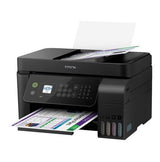
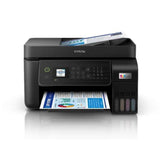


Epson WorkForce EcoTank ET-4800 Inkjet All-in-One Printer
Add multiple items to your order — pay just $25/week total, no matter how many items. One contract, one payment, items delivered as you pay them off.
Browse more items →100% Traditional Layby. Delivery after full payment.
Attention, eager beaver! Need your delivery in a flash?
No worries, mate! We're here to save the day! Just give us an email at  and let us know if you would like to pay more or less each week. Rest assured, we'll also provide you with an estimated delivery date when we make these changes. So don't you worry, your delivery dreams are in safe hands!
The Epson EcoTank ET-4800 wireless all-in-one printer offers cartridge-free printing with easy-to-fill, supersized ink tanks. Each replacement ink bottle set includes enough ink to print up to 4,500 pages1Â - equivalent to about 203 individual cartridges2, that means less waste. Exclusive uniquely keyed EcoTank bottles make it easy to fill each colour tank. Â The ET-4800 also offers a 30-sheet ADF, wired and wireless networking plus a 2-year Return to Base Warranty with registration.
- Cartridge-Free Printing - integrated high capacity ink tank system
- Includes Enough Ink to Print up to 3,600 pages black / 6,500 colour - equivalent to about 174 individual cartridges
- Wireless - easily print from tablets and smartphones
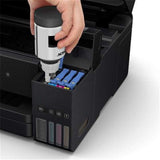
- Exclusive Auto-Stop Ink Bottles - uniquely keyed for easy filling of each colour
- Versatile - 30 Page automatic document feeder to easily copy, scan and fax
- Easy Setup and Menu Navigation - 1.44" LCD
- One-Touch Copying - get high quality copies fast
PRINTING FREEDOM
With an integrated high capacity ink tank system, the Epson EcoTank ET-4800 comes with enough ink in the box to print up to 3,600 pages in black and 6,500 pages in colour1 without worrying about ongoing ink replacement and costs.
HIGH-VOLUME INK BOTTLES
Additional low-cost ink can be bought in convenient high-volume bottles that have a drip-free nozzle and resealable cap for easy storage and refilling. We have redesigned our ink bottles to incorporate a unique key system. Each bottle is keyed so that it only fits into the corresponding ink tank on the printer, thus preventing mis-filling or spillage. Replacement bottles hold enough ink for a massive 4,500 pages in black and 7,500 pages in colour1.Â
NEVER CHANGE AN INK CARTRIDGE AGAIN
The WorkForce ET-4800 features a revolutionary, integrated high-capacity ink tank system, offering an unbeatable combination of convenience and value.
In 3 easy steps users get printing freedom. All you have to do is fill or refill the tanks, set up your printer and then print without concern, week after week, month after month.
EVERYDAY PERFORMANCE
Simple wireless connectivity
The Epson EcoTank ET-4800 supports the latest wireless standard, 802.11 b/g/n7 and includes Wi-Fi Direct®. Which means no router is required, providing users with greater coverage and faster speeds. You can use your EcoTank printer from anywhere in your home and share it with multiple PCs. Sharing the printer on your network is quick and easy with built in Ethernet.Â
Wired Networking
Built in Ethernet makes sharing the printer on your network quick and easy.
Productivity anytime, anywhere5
Users can easily print from their tablet or smartphone using Epson Connect™ solutions. Supports Android™6, AirPrint™, iPad and iPhone, Chromebook™, Fire™-OS, Mac®, and Windows® devices. Wirelessly print a range of documents, reports, assignments, recipes and so much more whether at home or on the go.
Print from your iPad or iPhone
Apple® Airprint™ makes it simple to print emails, web pages, assignments and documents straight from your iPad or iPhone. There's no software to download, no drivers to install and no cables to connect. Your Apple® IOS® device will automatically connect to the printer.
DO MORE
The Epson EcoTank ET-4800 is our most versatile EcoTank for the home office, allowing you to scan, copy and fax easily with the convenient 30-page Automatic Document Feeder (ADF). Featuring a front paper tray with a 100-sheet paper capacity, so you can load less often.
HIGH-SPEED FAXING
Fax as fast as 3 seconds per page, save up to 100 pages in memory, and store up to 100 speed dialing numbers. Using the included PC-Fax, you can even send a colour fax right from your computer. It is a great way to save time and paper.
EASY
Easy to use
An innovative interface, the Epson Smart Panel app5 transforms your iOS® or Androidâ„¢ mobile device6 into an intuitive control center for your Epson EcoTank ET-4800. This powerful tool makes it easy to set up, monitor, print, scan and more using your Epson printer, right from your hand-held device. With quick-configuration features, it offers easy product setup on your wireless network and automatically detects your printer. Customize the app to your own preferences and requirements. Built to offer everything you need in one convenient app, Epson Smart Panel allows you to register your product, order supplies and easily access troubleshooting tips.Â
Scan and copy, PC-free
Get high-quality colour or black-and-white copies in a snap
Simple Navigation
Navigating the printer menu is easier than ever with the 1.44" colour LCD and the user-friendly control panel buttons. Making printing of documents, reports, invoices and presentations so much easier whether at home office or on the g
PRINTER TYPE:
PRODUCT CODE:C11CJ65501
PRINTING TECHNOLOGY:4-Colour (CMYK), drop-on demand MicroPiezo® inkjet technology
MAXIMUM PRINT RESOLUTION:5,760 x 1,440 dpi
ISO PRINT SPEED :Black 10.0 ISO ppm1
Colour 5 ISO ppm
MINIMUM INK DROPLET SIZE:As small as 3 picoliters
INK:
INK TYPE:EcoTank Ink Bottles
INK PALETTE:Cyan, Magenta, Yellow, Black
INK CONFIGURATION:4 individual ink bottles
BUNDLED INK:
522 Black, Cyan, Magenta, Yellow
(ISO Yield, Epson Methodology - Black: 3,600, Colour: 6,500)2
REPLACEMENT INK:
522 Black, Cyan, Magenta, Yellow
(ISO Yield, Epson Methodology - Black: 4,500, Colour: 7,500)2
GENERAL:
OPERATING SYSTEMS:
Windows® 11
Windows® 10
Windows® 8, 8.1 (32-bit, 64-bit)
Windows® 7 (32-bit, 64-bit)
Windows® Vista
Mac® OS X® 10.6.8 - Mac® OS X® 10.15.x3
SERVER SYSTEMS
Windows Server® 2003 - Windows Server 20194 (32-bit, 64-bit)
TEMPERATURE:Operating: 10° to 35° C
Storage: -20° to 40° C
HUMIDITY:
Operating: 20 - 80% RH
Storage: 5 - 85% RH (no condensation)
DIMENSIONS:
Printing: 375mm x 578mm x 253mm (W x D x H)
Storage: 375mm x 347mm x 237mm (W x D x H)
WEIGHT:5kg
COPY:ISO COPY SPEED
Black: 7.7 ISO ppm
Colour: 3.8 ISO ppm
COPY QUANTITY:99 (PC-free)
MAXIMUM COPY SIZE:A4
COPY FEATURES:Reduction & Enlargement (25 - 400%)
SCAN:
SCANNER TYPE:Colour flatbed / ADF
AUTOMATIC DOCUMENT FEEDER (ADF) CAPACITY:30 sheets
PHOTOELECTRIC DEVICE:Colour CIS line sensor
OPTICAL RESOLUTION:1,200 dpi
HARDWARE RESOLUTION:1,200 x 2,400 dpi
MAXIMUM RESOLUTION:9,600 dpi interpolated
COLOUR BIT DEPTH:48-bit colour input / 24-bit colour output
SCAN FEATURES:
Scan to: PC
FAX:
FAX SETTINGS:Black & White and Colour
FAX SPEED:Up to 33.6 Kbps - as fast as 3 sec per page
MEMORY:Up to 100 pages
SPEED DIALS:100 (max.)
PC FAX:Yes
CONNECTIVITY:
STANDARD CONNECTIVITY:Hi-Speed USB
Wireless (802.11 b/g/n)6
Ethernet (10/100 Mbps) Wi-Fi Direct6
MOBILE PRINTING SOLUTIONS:
EPSON CONNECT:Epson® Email Print, Epson Smart Panel, Epson iPrint™ App(iOS®, Android)
OTHER:Apple® AirPrint® , Mopria® Print Service
PAPER HANDLING
PAPER SIZES
Legal, Letter, 8.5" x 13", A4, B5, A5, A6, B6, user definable (182mm x 257mm - 215.9mm x 297mm")
MAXIMUM PAPER SIZES:215.9mm x 355.6mm
PAPER TYPES:
Plain Paper
Photo Quality Inkjet Paper
Epson Matte Paper
Epson Glossy Photo Paper
ENVELOPE TYPESÂ No. 10, C6, DL
INPUT PAPER CAPACITY:100 sheets
PRINTER DETAILS:
DISPLAY:1.44" colour LCD
PRINTER LANGUAGE:ESC/P-R
SOFTWARE INCLUDED:
EPSON printer driver, EPSON Scan: Internet access is required to install OS X drivers and software.
POWER:
RATED VOLTAGE:AC 100 - 240V Universal (Automatic)
RATED FREQUENCY:50 - 60 Hz
POWER CONSUMPTION:
Approx. 12 W ISO 24712 (Standalone copy printing)
Approx. 4.5 W (Ready)
Approx. 0.7 W (Sleep)
Approx. 0.2 W (Power off) ENERGY STAR® qualif
We can only process ONE order per customer at a time.Â
Layby with Layaway Depot
Choose your purchase
Browse our huge Layby only product range. Tap 'Customise Layby plan' to add item to cart.
Set your payment plan
The Mini Cart lets you customise your payment plan. Choose the plan length, and a payment frequency that suits you. You can Layby one item or place multiple items in one plan. You can have multiple plans, but need to log out and in again to create each extra one.
Checkout, make first payment
Review your payment plan, head to checkout and confirm your order. Make your first payment and you're buying the budget-friendly way.
Keep track on your dashboard
Your dashboard is a snapshot of your Layaway Depot account. You can track payments, check orders, adjust settings, get updates and more.
Complete plan, receive your order!
When your final payment has been processed, we quickly ship your product to you. Despatch will occur as close as possible to the date estimated when you customised your plan.
Delivery
All our stock is held in local warehouses in New Zealand.
Layaway Depot will usually dispatch your goods within 7 - 21 business days of completing your Layby payments.
This time frame factors in the confirmation of the Layby order include your payment method, processing and dispatch from the warehouse and the transport of the items via couriers. The 'In Stock' status on our website can mean the stock is either in our warehouse, or available with our supplier.
Whilst we endeavour to get items delivered to you as soon as possible we do, however, need to allow that 7 - 21 business day window to accommodate the processes above.
Delivery tracking details will be emailed to the email address on the account as soon as they are known. Your goods must be delivered to the delivery address as shown on your initial order.
Deliveries require a signature on delivery and if no one is at the property to sign for the package a calling card will be left by the driver with details of how to arrange redelivery or collection.
If their are multiple items on your order, you may receive multiple deliveries shipped by multiple couriers since items may be sent from different warehouse locations.
Large/bulky items (eg furniture and whitegoods) may take longer to deliver and may also incur an additional freight fee. If an additional freight fee is expected for your order you will be contacted via email after the order has been successfully placed.
Find out more →Returns
We guarantee your satisfaction with all Layaway Depot merchandise. If you receive damaged, defective, or incorrect item(s), you may return the product(s) at no cost to you. Once we receive the item(s) and verify the return of product(s), we will send you a replacement or issue you a full refund, including shipping and handling.
Please choose carefully when ordering. Once you have ordered the item, you are committed to the purchase. Under the Consumer Guarantees Act, you are only entitled to a refund in the event of a major product failure - not if you simply change your mind or you later discover that you picked the wrong colour or the item doesn't fit.
You are entitled to a refund if the item you purchased is: not of acceptable quality, does not match the description, does not match the sample or demonstration model shown to you or for any other reason permitted under the Consumer Guarantees Act.
Please contact our customer service department at admin@layawaydepot.co.nz to lodge a return.
You may also like...


IGNITENET SP-W2-AC1200 Spark Indoor/Outdoor Wave 2 Dualband Enterprise 802.11ac AP


HP Home Office Startup Pack Includes one 6420E Inkjet MFP Printer & 1500 Sheets A4 Paper


