

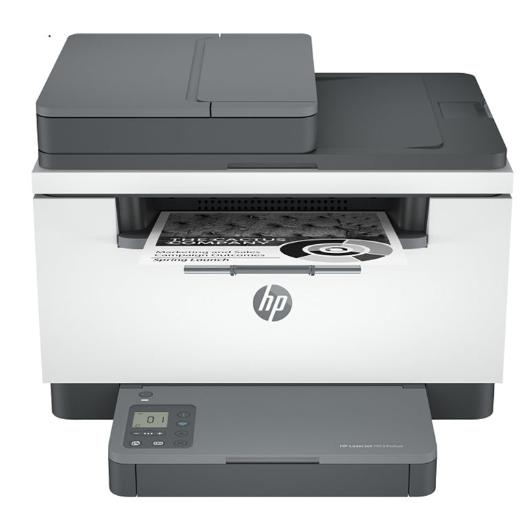
HP LaserJet M234SDW Mono Laser Multifunction Printer
$25 a week
- $0 today
- No credit check
- Free delivery NZ-wide
14 payments.
- New, with the maker’s warranty
- Free delivery NZ-wide once it’s paid off
- No credit check, ever


100% Traditional Layby. Delivery after full payment.
Attention, eager beaver! Need your delivery in a flash?
No worries, mate! We're here to save the day! Just give us an email at admin@layawaydepot.co.nz  and let us know if you would like to pay more or less each week. Rest assured, we'll also provide you with an estimated delivery date when we make these changes. So don't you worry, your delivery dreams are in safe hands!
( $50.00 Cashback [Valid 01/06/24 - 03/09/24, NZ Only] )
HP LaserJet MFP M234SDW Mono laser printer
A high-productivity MFP with the fastest two-sided printing in its class, an automatic feeder, and the time-saving HP Smart app. Count on peace of mind from more reliable connections, and a worry-free experience with simplified setup.
HP Personal Laser Multifunction Printers are designed for individuals or small workteams who need affordable, reliable multifunction performance in a compact and easy-to-use desktop device.
This printer is intended to work only with cartridges that have a new or reused HP chip, and it uses dynamic security measures to block cartridges using a non-HP chip. Periodic firmware updates will maintain the effectiveness of these measures and block cartridges that previously worked. A reused HP chip enables the use of reused, remanufactured, and refilled cartridges.Â
Functions:Print, copy, scan
Print speed:Up to 30 ppm Measured using ISO/IEC 24734, excludes first set of test documents. For more information see http://www.hp.com/go/printerclaims. Exact speed varies depending on the system configuration, software application, driver, and document complexity.
Printer page yield:Approximate yield. Actual yield depends on printer and specific use. See http://www.hp.com/go/pageyield for more information.
First page out (ready) black:As fast as 6.9 sec
Resolution (black):Up to 600 x 600 dpi
Monthly duty cycle:
Up to 20,000 pages
Duty cycle is defined as the maximum number of pages per month of imaged output. This value provides a comparison of product robustness in relation to other HP LaserJet or HP Color LaserJet devices, and enables appropriate deployment of printers and MFPs to satisfy the demands of connected individuals or groups.
Recommended monthly page volume:200 to 2,000
Print Technology:Laser
Display:1.6" Icon LCD
Number of print cartridges:1 (black)
Replacement cartridges:HP 134A Black LaserJet Toner Cartridge, W1340A (~1100), HP 134X Black LaserJet Toner Cartridge, W1340X (~2400)[4]
Product disclaimer:
This printer is intended to work only with cartridges that have a new or reused HP chip, and it uses dynamic security measures to block cartridges using a non-HP chip. Periodic firmware updates will maintain the effectiveness of these measures and block cartridges that previously worked. A reused HP chip enables the use of reused, remanufactured, and refilled cartridges. More at:
http://www.hp.com/learn/ds
Print languages:PCLmS; URF; PWG
Automatic paper sensor:Yes
Paper trays:1
Mobile Printing Capability:Apple AirPrint™; HP Smart App; Mopria™ Certified; Wi-Fi® Direct Printing
Connectivity:1 Hi-Speed USB 2.0; 1 Fast Ethernet 10/100Base-TX; 1 Dual-band (2.4/5.0GHz) Wireless 802.11b/g/n with Bluetooth® Low Energy
Security management:
Secure Boot, Secure Firmware Integrity, Runtime Code Integrity, password protected EWS, secure browsing via SSL/TLS 1.0, TLS 1.1, TLS 1.2; TLS 1.0/1.1 disabled by default; Update to OpenSSL version 1.1.1; enable/disable Network ports; SNMPv1, SNMPv2, and SNMPv3, community password change; Secure defaults, Encrypted data at rest, Active FW update, Admin password by default, Cipher & TLS selection; Account lockout; Secure Wi-Fi setup
Minimum system requirements:
Apple® macOS v10.14 Mojave, macOS v10.15 Catalina, macOS v11 Big Sur; 2 GB HD; Internet required
Microsoft® Windows® 10, 8.1, 8, 7: 32-bit or 64-bit, 2 GB available hard disk space, Internet connection, Microsoft® Internet Explorer.
Compatible operating systems:
Microsoft® Windows® 10, 8.1, 8, 7: 32-bit or 64-bit, 2 GB available hard disk space, Internet connection, USB port, Microsoft® Internet Explorer. Apple® macOS v10.14 Mojave, macOS v10.15 Catalina, macOS v11 Big Sur; 2 GB HD; Internet required; USB; Linux (For more information, see https://developers.hp.com/hp-linux-imaging-and-printing)
Memory card compatibility:No
Memory:64 MB
Printer management:HP Printer Assistant (UDC); HP Device Toolbox
Supported network protocols:TCP/IP: IPv4; IPv6; LPD; SLP; Bonjour; WS-Discovery; BOOTP/DHCP/AutoIP; SNMP v 1/2/3;HTTP/HTTPS; UDP; IPP
Hard disk:No
Paper handling input:150-sheet input tray
Paper handling output:100-sheet output tray
Duplex printing:Auto-duplex
Envelope input capacity:Up to 10 envelopes
Media sizes supported;A4; A5; A6; B5 (JIS)
Media sizes:;4 x 6 to 8.5 x 14 in
Media types:Paper (laser, plain, rough, vellum), Envelopes, Labels, Cardstock, Postcard
Supported media weight:16 to 43 lb
Media weights by paper path:60 to 163 g/m²
Power:;110-volt input voltage: 110 to 127 VAC (+/- 10%), 60 Hz/50 Hz, 4.8 A
Power consumption:
453 watts (active printing), 3.3 watts (ready), 0.6 watts (sleep), 0.6 watts (Auto Off/Wake on LAN, enabled at shipment), 0.04 watts (Auto-off/Manual-on), 0.04 (Manual Off)
Power requirements are based on the country/region where the printer is sold. Do not convert operating voltages. This will damage the printer and void the product warranty. Power consumption values typically based on measurement of 115V device.
Energy efficiency:EPEAT® Silver; ENERGY STAR® certified
Operating temperature range:59 to 90.5ºF
Operating humidity range30 to 70% RH
Software included;:Downloadable Software from hp.com or 123.hp.com; #CD include HP Software Installer, Uninstaller, printer driver and other essential tools
Dimensions (W X D X H):16.46 x 12.13 x 11.59 in
Dimensions Maximum (W X D X H):16.46 x 18.41 x 17.83 in
Weight:20.95 lb
Package weight:27.44 lb
What's in the box:HP LaserJet MFP M234sdw Printer; HP Black LaserJet Toner Cartridge (~700 page); Reference Guide; Setup Poster; Warranty Guide & Flyer in some countries; Power cord
Cable included:No, USB cable for all regions
Sustainability Impact:Mercury free
We can only process ONE order per customer at a time.Â
How do the payments work?
How do the payments work?
You pay nothing today. Pick $15, $25 or $50 a week and it comes out of your bank account by direct debit on the day you choose, weekly or fortnightly, until the price shown is paid. No interest, no credit check, and the price never goes up because you take longer.
When do I get it?
When do I get it?
After your final payment. We order the exact item on this page and deliver it free, anywhere in New Zealand, with tracking. The timeframe is set out in your agreement.
Can I get it sooner?
Can I get it sooner?
Yes. Raise your weekly amount in your account at my.layawaydepot.co.nz and your final payment moves closer. You can lower it again, move your payment day or take a break the same way, free.
What does cancelling cost?
What does cancelling cost?
You can cancel any time before delivery by emailing retentions@layawaydepot.co.nz. Cancel within 10 business days of your order confirmation and there is no fee. After that the fee is $55, or 20% of the payments you have made if that is higher, capped at $250 and never more than you have paid. The rest is refunded to your original payment method.
Is this credit?
Is this credit?
No. Layby isn’t credit. There is no credit check, no interest and nothing owed. You pay towards the item and it is delivered once it is yours. If a payment fails we retry it; a $2.50 administration fee applies to each failed payment.
Your payments come out of your bank account by direct debit under the Direct Debit Service Agreement in the terms. Nothing is taken today.
Start it today for $0.
$25 a week, and it’s delivered free once it’s paid off.
More in computers & tablets